
Proven quality
The RedmineUP Checklist plugin is the highest rated plugin in the Redmine marketplace

Use templates
Create checklist templates with preassigned tasks to save time

Integrated with Agile boards
See and interact with checklists straight on the Agile board

14 language versions
Bulgarian, German, English, Spanish, French, Japanese, Korean, Polish, Portuguese (Brazil), Russian, Slovak, Swedish, Ukrainian, Chinese
Your plugins are professional and easy-useable. We are very fond of your support and glad that your plugins are well-documented and the installation process is easy. We have thousands of tasks or issues, so your plugins are very useful.
Gaoming Wu, Owner of Tecsoon
Features
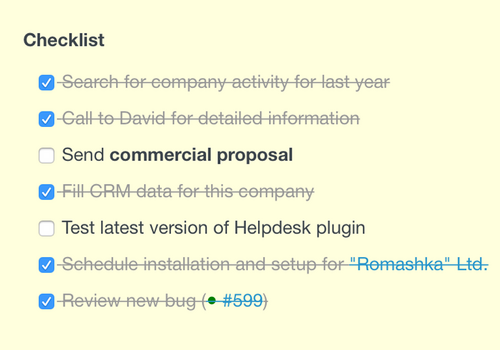
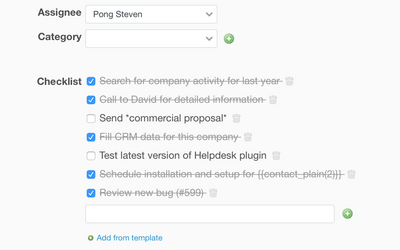
One click edits
Effortlessly add, delete, and mark checklist elements as "Done" with Ajax technology
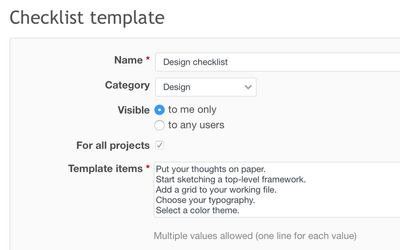
Templates
Fasten creating new issues and projects by creating and using the checklist template for recurring use
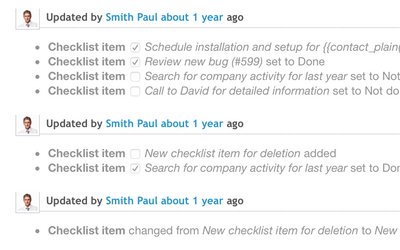
Integrated with issue history log
All the changes made to the checklist are added automatically to the issue history log
Requirements
| Redmine | 5.1 - 4.0 |
|---|---|
| Ruby | 3.7 - 2.0 |
| Database | SQLite, MySQL, PostgreSQL, SQL Server |
| OS | Linux, OS X, Windows |
| Browsers | Chrome, Safari, Internet Explorer and Firefox |
Over 140 000 companies from 120 countries use RedmineUP plugins, themes and services








Pricing
Additional features of PRO Version
Saving checklist changes history with email notification
Checklist filters for issues list
Checklist templates with categories
Automatic checklists for specific trackers
Bundles and offers
RedmineUP Full stack bundle
Get all plugins bundle with 48% discount
Order Full stack bundle | $179914 plugins bought separately: $3 436.00 – You save $1 637.00
Over 140 000 companies from 120 countries use RedmineUP plugins, themes and services




Checklists WORKS GREAT WITH



What People Say About RedmineUP

Modules are simple, easy to install, and what's more use and support is just awesome! We have been using the plugins from RedmineUP for last 4 years and we're very happy with the support and upgrades we are getting from you guys
— Krunal Jariwala, CEO Xcellence-IT


We have over 50.000 issues and over 500 contacts in our Redmine. I like that the plugins are covering other processes as well, not only the ones related to the development process, and they are enabling various implementations or integrations. Regarding the business needs, I think that RedmineUP plugins are a good starting point.
— Marius Balteanu, Head of Quality Assurance & Partner Zitec


In Morele.net we use Redmine fo projects portfolio management and system maintenance. We use several RedmineUP's plugins: Agile, Helpdesk, People. I am very pleased with their functionality and the transparency of the user interface.
— Adam Rataj, Director of Software Development Department Morele.net
